Μετάβαση στο περιεχόμενο
WordPress.org

Ελληνικά

  • Θέματα
  • Πρόσθετα
  • Νέα
  • Υποστήριξη
  • Σχετικά
  • Ελληνική κοινότητα
  • Εκδηλώσεις
  • Openverse
  • Κατάλογος μοτίβων
  • Λήψη WordPress
Λήψη WordPress
WordPress.org

Plugin Directory

Advanced Category and Custom Taxonomy Image

  • Submit a plugin
  • My favorites
  • Log in
  • Submit a plugin
  • My favorites
  • Log in

Advanced Category and Custom Taxonomy Image

Από Sajjad Hossain Sagor
Λήψη
Live Preview
  • Λεπτομέρειες
  • Κριτικές
  • Εγκατάσταση
  • Ανάπτυξη
Υποστήριξη

Περιγραφή

Now its easier to include category / custom taxonomy image with this plugin for different platforms. No need to overload mobile bandwidth with high pixel image size. You can now select different image for different devices. Upload Different Image For Different Devices ex: Mobile, Tablet, Desktop, iOS, Android, Windows Phone.
Built-in Template Tag To Use Anywhere You Want In Your Theme : get_taxonomy_image( $term_id, $return_img_tag, $class );

Documentation

$taxonomy_img = get_taxonomy_image( int $term_id = get_queried_object()->term_id , boolean $return_img_tag = false , string $class = '' );

get taxonomy image url if $return_html = true then return  tag

Parameters :
$term_id
(int) (Required) Taxonomy ID of the term.

$return_img_tag
(boolean) (Optional) Formatted Image with  tag for the field during output.

$class
(string) (Optional) A space separated string of CSS classes to add to the  tag. classes ex: "your custom class list separated by space" but $return_img_tag should be true to add image class.

echo $taxonomy_img; // taxonomy image url

where $term_id is ‘category / term id’

Shortcode : use the shortcode anywhere to get taxonomy image. If you don’t provide “term_id” value then it will be current queried page taxonomy automatically.

echo do_shortcode( '[ad_tax_image term_id="" return_img_tag="true" class="your custom class list seperated by space"]' ); // keep term_id empty if you want to show current visited taxonomy archive image.

Features

  • Option To Enable Custom Image Upload for different taxonomies
  • Option To Enable Custom Image Upload for different devices
  • Very simple to use & WP Default Media Uploaded to upload image
  • Built-in Template Tag to use in your theme template
  • Shortcode to use anywhere.

Στιγμιότυπα

Settings page for enabling taxonomy image upload for different taxonomies

Settings page for enabling taxonomy image upload for different devices
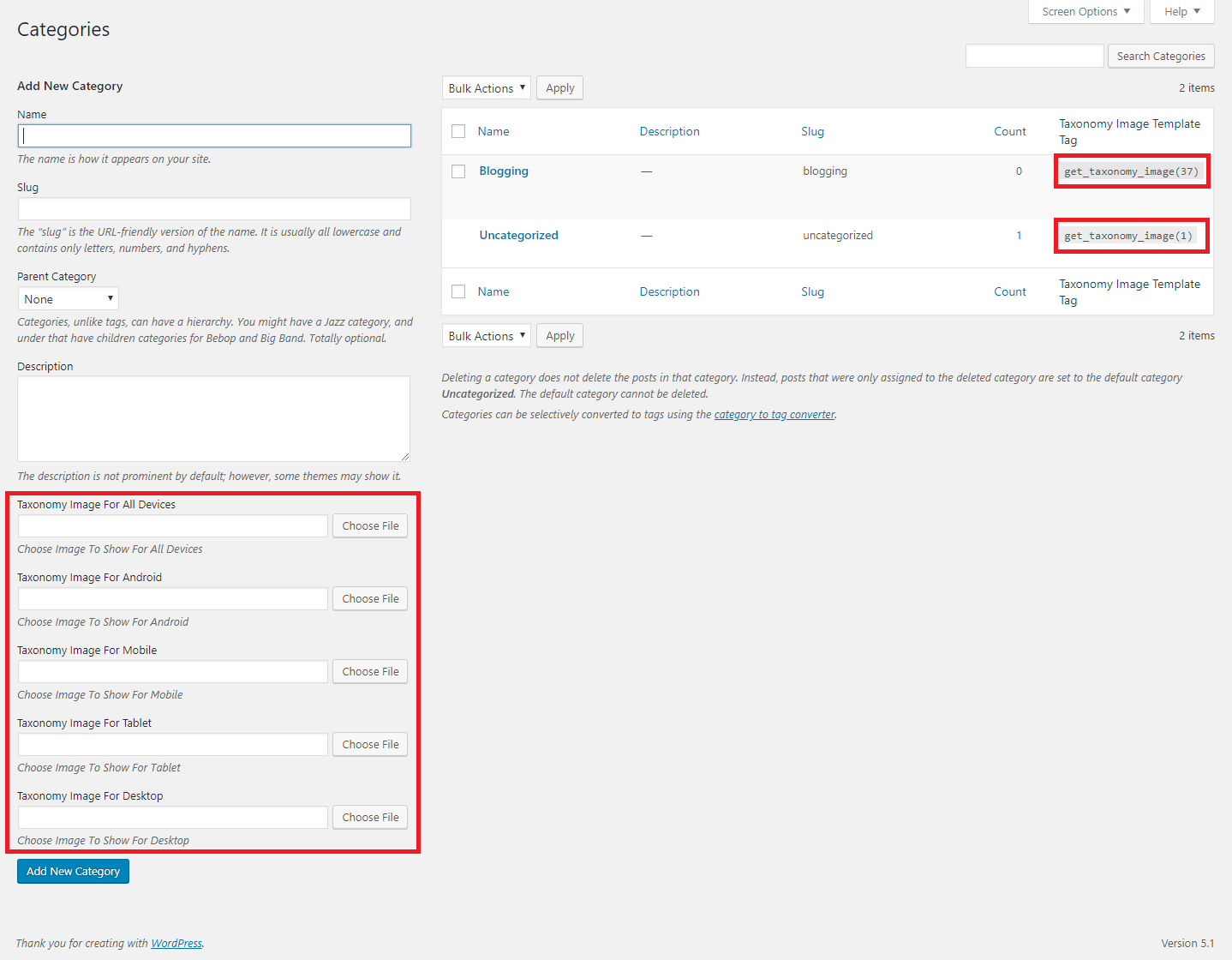
Auto Template Tag Generation
Taxonomy Edit Page
Taxonomy Edit Page

Εγκατάσταση

  1. Go to WordPress plugin page
  2. Click Add New & Upload Plugin
  3. Drag / Click upload the plugin zip file
  4. The resulting installation screen will list the installation as successful or note any problems during the install. If successful, click Activate Plugin to activate it, or Return to Plugin Installer for further actions.
  5. Go to your Dashboard -> Settings -> Advanced Category & Taxonomy Image.
  6. There You Will Find Fields To Enable Taxonomy & Device Filters.
  7. After Enabling Go To Your Taxonomy Add/Edit Page To Upload Image

Συχνές Ερωτήσεις

  1. How can i use the image i uploaded?
    Get Your Taxonomy tag_ID and use get_taxonomy_image( $term_id ) to get the image url and use it in your theme’s template area where you want to show it. (Note : In the taxonomy list there you will find already created template tag to use see screenshot 3)

Κριτικές

Great support

zydecon 7 Νοεμβρίου 2025
Great support. The plugin had a bug and the plugin author fixed it immediately.

Simple, effective plugin.

fwuk 8 Ιουλίου 2022
I have used it. Works fine. Thank you for a useful plugin.

This plugin is a life saver

30 Ιανουαρίου 2021
Really good plugin, the author responds quickly and is very friendly.

How display image on single.php

Taher Almahdi 5 Ιουλίου 2020 1 απάντηση
I try to display taxonomy images on single post using <?php get_taxonomy_image(1455); ?>, but images don’t show. How does slove this issue?

Nice plugin!!!

Rigo Sandoval Uribe 6 Σεπτεμβρίου 2019
Excellent plugin for different images for each device.
Ανάγνωση όλων των 5 κριτικών

Συνεισφέροντες & Προγραμματιστές

“Advanced Category and Custom Taxonomy Image” είναι λογισμικό ανοιχτού κώδικα. Οι παρακάτω έχουν συνεισφέρει στη δημιουργία του.

Συντελεστές
  • Sajjad Hossain Sagor

Μεταφράστε το “Advanced Category and Custom Taxonomy Image” στην γλώσσα σας.

Ενδιαφέρεστε για την ανάπτυξη;

Περιηγηθείτε στον κώδικα, ανατρέξτε στο αποθετήριο SVN ή εγγραφείτε στο αρχείο καταγραφής αλλαγών ανάπτυξης μέσω RSS .

Σύνοψη αλλαγών

2.1.0

  • Compatibility checkup for latest wp version 7.0

2.0.9

  • Added option to select message type when no image is found

2.0.8

  • Compatibility checkup for latest wp version 6.9

2.0.7

  • Fixed issue: Tax image was not updating for any device type.
  • Enhancements: Now you can see selected image real time.

2.0.6

  • Fixed issue: typo giving fatal error

2.0.5

  • Fixed issue: when there are no device enabled it gives fatal error

2.0.4

  • Minor changes in the code styling

2.0.3

  • Compatibility checkup for latest wp version 6.8

2.0.2

  • If for specific device image is not set yet, it will opt for default any device image now

2.0.1

  • Fixed bug function get_taxonomy_image() was not found

2.0.0

  • Major changes in codebase. Compatibility checkup for latest wp version 6.7

1.1.0

  • Previous version had a bug where Image were not showing even after upload, it has been fixed. Everyone is recommended to update to the latest version. Any device filter is removed from Advanced tab and added as a global device.

1.1.0

  • Major Update.. Please do take backup and update the plugin. Applied wp standard security sanitizations and escaping output to avoid any vulnerability. After update please go check your settings thoroughly and check if it works properly.

1.0.9

  • Minor Update.. tested for latest wp compatibility..

1.0.8

  • Added a new shortcode for dynamic usage in any template or dnd builder. Plus tested for latest wp compatibility..

1.0.7

  • Minor Update.. tested for latest wp compatibility..

1.0.6

  • Minor Update.. tested for latest wp compatibility.. added any device option and code style changed and beautified.

1.0.5

  • Minor Update.. now tax template tag won’t be visible if no image is added

1.0.4

  • Minor Update.. updated for translations ready..

1.0.3

  • Minor Update.. tested for latest wp compatibility..

1.0.2

  • Minor Update.. tested for latest wp compatibility..

1.0.1

  • Minor Update.. tested for latest wp compatibility..

1.0.0

  • Initial release.

Μεταστοιχεία

  • Version 2.1.0
  • Τελευταία ενημέρωση: πριν από 2 μήνες
  • Ενεργές εγκαταστάσεις: 1,000+
  • Έκδοση WordPress: 5.6 ή νεότερη
  • Δοκιμασμένο μέχρι: 7.0.2
  • Έκδοση PHP: 8.0 ή νεότερη
  • Language
    English (US)
  • Ετικέτες:
    category imagecategory-logofeatured imagetaxonomy imageterm image
  • Σύνθετη Προβολή

Αξιολογήσεις

5 out of 5 stars.
  • 5 5-star reviews 5 stars 5
  • 0 4-star reviews 4 stars 0
  • 0 3-star reviews 3 stars 0
  • 0 2-star reviews 2 stars 0
  • 0 1-star reviews 1 star 0

Your review

Δείτε όλες τις κριτικές

Συντελεστές

  • Sajjad Hossain Sagor

Υποστήριξη

Έχετε κάτι να πείτε; Χρειάζεστε βοήθεια;

Φόρουμ υποστήριξης

  • Σχετικά
  • Ειδήσεις
  • Φιλοξενία
  • Απόρρητο
  • Βιτρίνα
  • Θέματα
  • Πρόσθετα
  • Μοτίβα
  • Μάθετε
  • Υποστήριξη
  • Προγραμματιστές
  • WordPress.TV
  • Συμμετέχετε
  • Εκδηλώσεις
  • Δωρίστε
  • Πέντε για το Μέλλον
  • WordPress.com
  • Matt
  • bbPress
  • BuddyPress
WordPress.org
WordPress.org

Ελληνικά

  • Visit our X (formerly Twitter) account
  • Visit our Bluesky account
  • Επισκεφθείτε τον λογαριασμό μας στο Mastodon
  • Visit our Threads account
  • Επισκεφτείτε τη σελίδα μας στο Facebook
  • Επισκεφθείτε τον λογαριασμό μας Instagram
  • Επισκεφθείτε τον λογαριασμό μας LinkedIn
  • Visit our TikTok account
  • Visit our YouTube channel
  • Visit our Tumblr account
Ο κώδικας είναι ποίηση.
The WordPress® trademark is the intellectual property of the WordPress Foundation.