
Περιγραφή
Limit the number of login attempts possible both through normal login as well as using auth cookies.
By default WordPress allows unlimited login attempts either through the login page or by sending special cookies. This allows passwords (or hashes) to be brute-force cracked with relative ease.
Limit Login Attempts blocks an Internet address from making further attempts after a specified limit on retries is reached, making a brute-force attack difficult or impossible.
Χαρακτηριστικά
- Limit the number of retry attempts when logging in (for each IP). Fully customizable
- Limit the number of attempts to log in using auth cookies in same way
- Informs user about remaining retries or lockout time on login page
- Optional logging, optional email notification
- Handles server behind reverse proxy
- It is possible to whitelist IPs using a filter. But you probably shouldn’t. 🙂
Translations: Bulgarian, Brazilian Portuguese, Catalan, Chinese (Traditional), Czech, Dutch, Finnish, French, German, Hungarian, Norwegian, Persian, Romanian, Russian, Spanish, Swedish, Turkish
Plugin uses standard actions and filters only.
Στιγμιότυπα
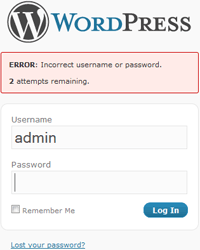
Loginscreen after failed login with retries remaining 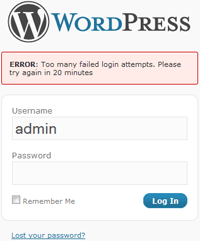
Loginscreen during lockout 
Administration interface in WordPress 3.0.4
Εγκατάσταση
- Download and extract plugin files to a wp-content/plugin directory.
- Activate the plugin through the WordPress admin interface.
- Customize the settings on the options page, if desired. If your server is located behind a reverse proxy make sure to change this setting.
If you have any questions or problems please make a post here: https://wordpress.org/tags/limit-login-attempts
Συχνές Ερωτήσεις
-
Why not reset failed attempts on a successful login?
-
This is very much by design. Otherwise you could brute force the “admin” password by logging in as your own user every 4th attempt.
-
What is this option about site connection and reverse proxy?
-
A reverse proxy is a server in between the site and the Internet (perhaps handling caching or load-balancing). This makes getting the correct client IP to block slightly more complicated.
The option default to NOT being behind a proxy — which should be by far the common case.
-
How do I know if my site is behind a reverse proxy?
-
You probably are not or you would know. We show a pretty good guess on the option page. Set the option using this unless you are sure you know better.
-
Can I whitelist my IP so I don’t get locked out?
-
First please consider if you really need this. Generally speaking it is not a good idea to have exceptions to your security policies.
That said, there is now a filter which allows you to do it: “limit_login_whitelist_ip”.
Example:
function my_ip_whitelist($allow, $ip) {
return ($ip == ‘my-ip’) ? true : $allow;
}
add_filter(‘limit_login_whitelist_ip’, ‘my_ip_whitelist’, 10, 2);Note that we still do notification and logging as usual. This is meant to allow you to be aware of any suspicious activity from whitelisted IPs.
-
I locked myself out testing this thing, what do I do?
-
Either wait, or:
If you know how to edit / add to PHP files you can use the IP whitelist functionality described above. You should then use the “Restore Lockouts” button on the plugin settings page and remove the whitelist function again.
If you have ftp / ssh access to the site rename the file “wp-content/plugins/limit-login-attempts/limit-login-attempts.php” to deactivate the plugin.
If you have access to the database (for example through phpMyAdmin) you can clear the limit_login_lockouts option in the wordpress options table. In a default setup this would work: “UPDATE wp_options SET option_value = ” WHERE option_name = ‘limit_login_lockouts'”
Κριτικές


Συνεισφέροντες & Προγραμματιστές
“Limit Login Attempts” είναι λογισμικό ανοιχτού κώδικα. Οι παρακάτω έχουν συνεισφέρει στη δημιουργία του.
Συντελεστές
Το “Limit Login Attempts” έχει μεταφραστεί σε 33 γλώσσες. Ευχαριστούμε τους μεταφραστές για τις συνεισφορές τους.
Μεταφράστε το “Limit Login Attempts” στην γλώσσα σας.
Ενδιαφέρεστε για την ανάπτυξη;
Περιηγηθείτε στον κώδικα, ανατρέξτε στο αποθετήριο SVN ή εγγραφείτε στο αρχείο καταγραφής αλλαγών ανάπτυξης μέσω RSS .
Σύνοψη αλλαγών
1.7.2
Security fixes.
1.7.1
This version fixes a security bug in version 1.6.2 and 1.7.0. Please upgrade immediately.
“Auth cookies” are special cookies set at login that authenticating you to the system. It is how WordPress “remembers” that you are logged in between page loads.
During lockout these are supposed to be cleared, but a change in 1.6.2 broke this. It allowed an attacker to keep trying to break these cookies during a lockout.
Lockout of normal password login attempts still worked as it should, and it appears that all “auth cookie” attempts would keep getting logged.
In theory the “auth cookie” is quite resistant to brute force attack. It contains a cryptographic hash of the user password, and the difficulty to break it is not based on the password strength but instead on the cryptographic operations used and the length of the hash value. In theory it should take many many years to break this hash. As theory and practice does not always agree it is still a good idea to have working lockouts of any such attempts.
1.7.0
- Added filter that allows whitelisting IP. Please use with care!!
- Update to Spanish translation, thanks to Marcelo Pedra
- Updated Swedish translation
- Tested against WordPress 3.3.2
1.6.2
- Fix bug where log would not get updated after it had been cleared
- Do plugin setup in ‘init’ action
- Small update to Spanish translation file, thanks to Marcelo Pedra
- Tested against WordPress 3.2.1
1.6.1
- (WordPress 3.0+) An invalid cookie can sometimes get sent multiple times before it gets cleared, resulting in multiple failed attempts or even a lockout from a single invalid cookie. Store the latest failed cookie to make sure we only count it as one failed attempt
- Define “Text Domain” correctly
- Include correct Dutch tranlation file. Thanks to Martin1 for noticing. Thanks again to Bjorn Wijers for the translation
- Updated POT file for this version
- Tested against WordPress 3.1-RC4
1.6.0
- Happy New Year
- Tested against WordPress 3.1-RC1
- Plugin now requires WordPress version 2.8+. Of course you should never ever use anything but the latest version
- Fixed deprecation warnings that had been piling up with the old version requirement. Thanks to Johannes Ruthenberg for the report that prompted this
- Removed auth cookie admin check for version 2.7.
- Make sure relevant values in $_COOKIE get cleared right away on auth cookie validation failure. There are still some problems with cookie auth handling. The lockout can trigger prematurely in rare cases, but fixing it is plugin version 2 stuff unfortunately.
- Changed default time for retries to reset from 24 hours to 12 hours. The security impact is very minor and it means the warning will disappear “overnight”
- Added question to FAQ (“Why not reset failed attempts on a successful login?”)
- Updated screenshots
1.5.2
- Reverted minor cookie-handling cleanup which might somehow be responsible for recently reported cookie related lockouts
- Added version 1.x Brazilian Portuguese translation, thanks to Luciano Passuello
- Added Finnish translation, thanks to Ari Kontiainen
1.5.1
- Further multisite & WPMU support (again thanks to erik@erikshosting.com)
- Better error handling if option variables are damaged
- Added Traditional Chinese translation, thanks to Denny Huang bigexplorations@bigexplorations.com.tw
1.5
- Tested against WordPress 3.0
- Handle 3.0 login page failure “shake”
- Basic multisite support (parts thanks to erik@erikshosting.com)
- Added Dutch translation, thanks to Bjorn Wijers burobjorn@burobjorn.nl
- Added Hungarian translation, thanks to Bálint Vereskuti balint@vereskuti.info
- Added French translation, thanks to oVa ova13lastar@gmail.com
1.4.1
- Added Turkish translation, thanks to Yazan Canarkadas
1.4
- Protect admin page update using wp_nonce
- Added Czech translation, thanks to Jakub Jedelsky
1.3.2
- Added Bulgarian translation, thanks to Hristo Chakarov
- Added Norwegian translation, thanks to Rune Gulbrandsøy
- Added Spanish translation, thanks to Marcelo Pedra
- Added Persian translation, thanks to Mostafa Soufi
- Added Russian translation, thanks to Jack Leonid (http://studio-xl.com)
1.3.1
- Added Catalan translation, thanks to Robert Buj
- Added Romanian translation, thanks to Robert Tudor
1.3
- Support for getting the correct IP for clients while server is behind reverse proxy, thanks to Michael Skerwiderski
- Added German translation, thanks to Michael Skerwiderski
1.2
- No longer replaces pluggable function when cookie handling active. Re-implemented using available actions and filters
- Filter error messages during login to avoid information leak regarding available usernames
- Do not show retries or lockout messages except for login (registration, lost password pages). No change in actual enforcement
- Slightly more aggressive in trimming old retries data
1.1
- Added translation support
- Added Swedish translation
- During lockout, filter out all other login errors
- Minor cleanups
1.0
- 1η έκδοση