Μετάβαση στο περιεχόμενο
WordPress.org

Ελληνικά

  • Θέματα
  • Πρόσθετα
  • Νέα
  • Υποστήριξη
  • Σχετικά
  • Ελληνική κοινότητα
  • Εκδηλώσεις
  • Openverse
  • Κατάλογος μοτίβων
  • Λήψη WordPress
Λήψη WordPress
WordPress.org

Plugin Directory

Webknit Site Toolkit

  • Submit a plugin
  • My favorites
  • Log in
  • Submit a plugin
  • My favorites
  • Log in

Webknit Site Toolkit

Από Webknit Digital
Λήψη
  • Λεπτομέρειες
  • Κριτικές
  • Εγκατάσταση
  • Ανάπτυξη
Υποστήριξη

Περιγραφή

Webknit Site Toolkit lets a site administrator:

  • Recolor the wp-admin sidebar, links, buttons, and form inputs, entered as hex codes or picked visually.
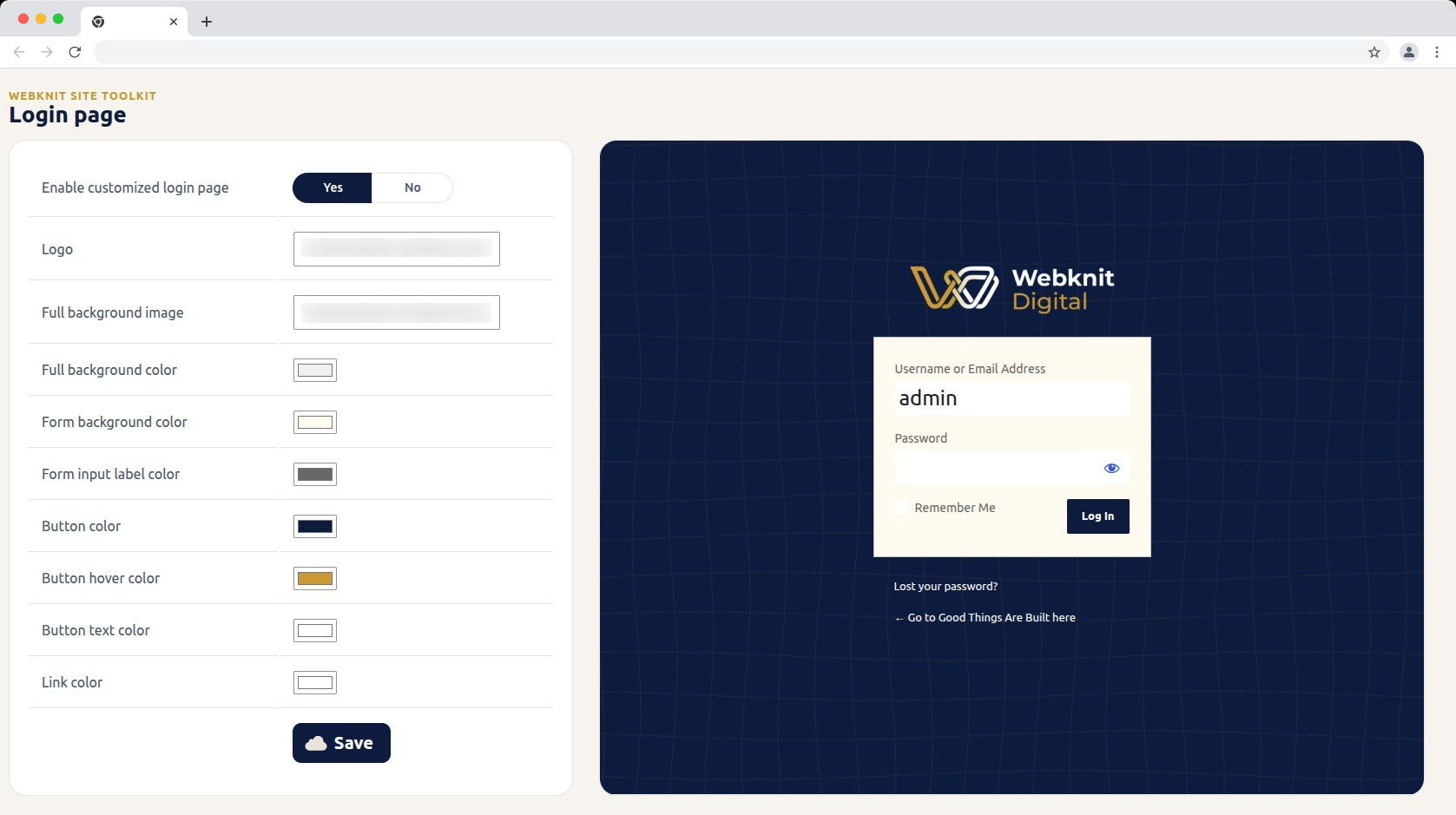
  • Customize the login screen: logo, full-page background image/color, form background/label colors, and button colors/text.
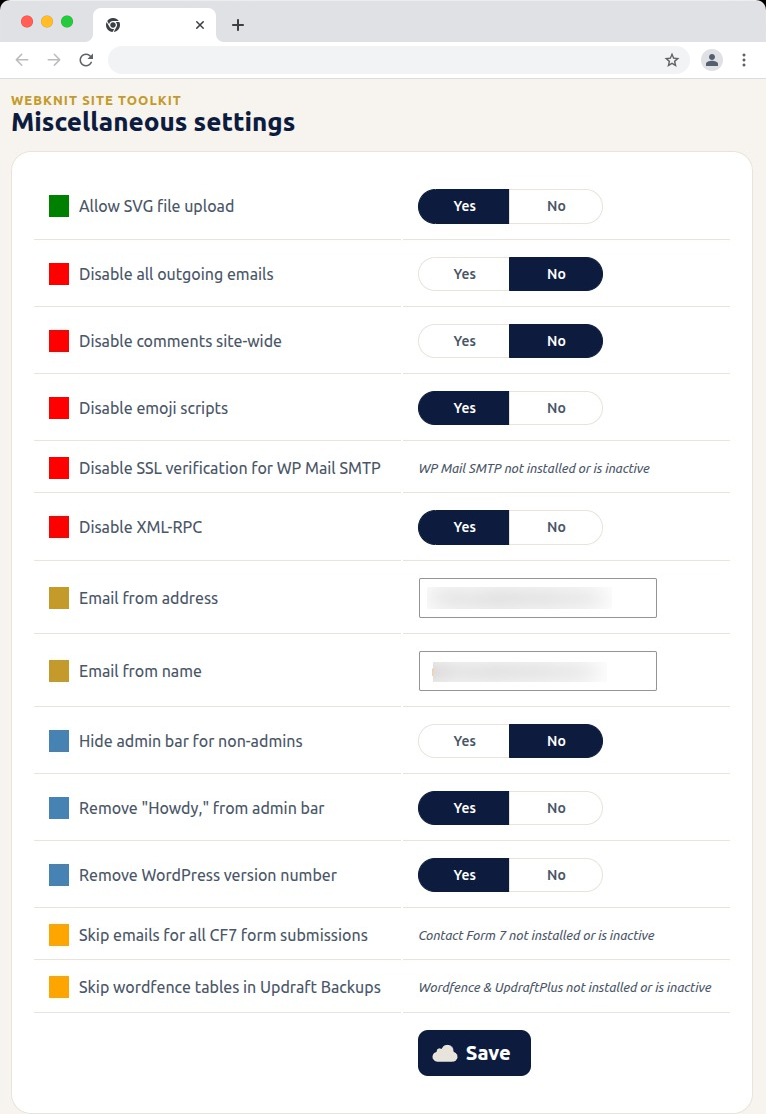
  • Toggle a set of miscellaneous settings: allow SVG uploads, disable SSL verification for WP Mail SMTP, disable outgoing emails, skip Wordfence tables during UpdraftPlus backups, skip Contact Form 7 submission emails, disable XML-RPC, remove the WordPress version number, disable emojis, hide the admin bar for non-admins, disable comments sitewide, remove “Howdy,” from the admin bar, and override the outgoing mail “from” name/address.

Στιγμιότυπα
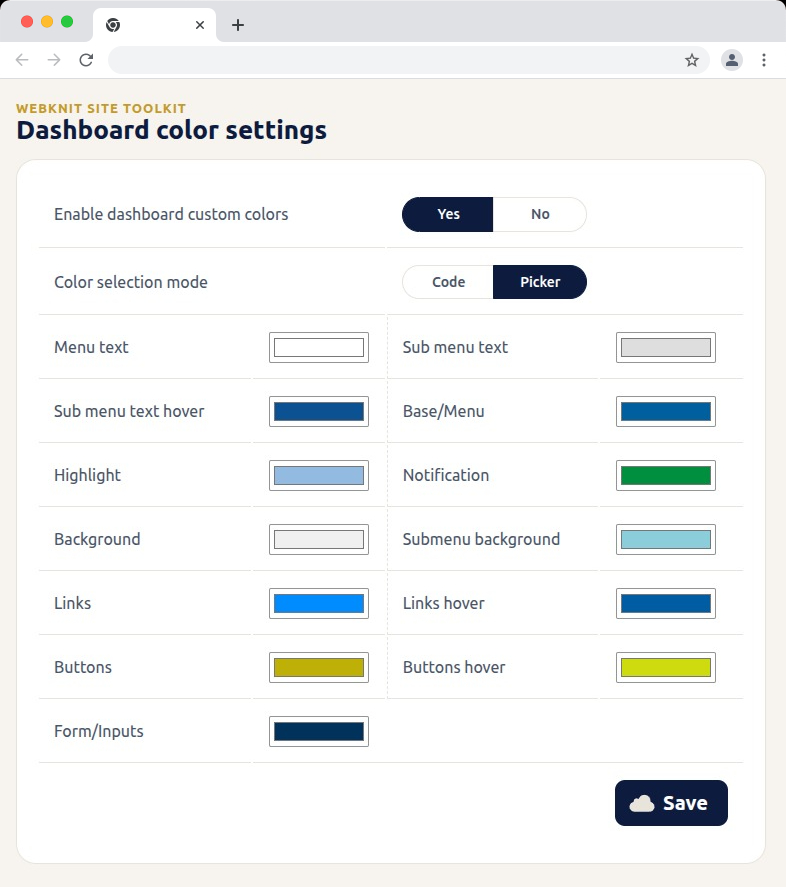
Dashboard color settings — recolor the wp-admin sidebar, links, buttons, and form inputs with hex codes or a visual picker.
Login page — customize the logo, background, form colors, and button styling, with a live preview alongside the settings.
Miscellaneous settings — toggle SVG uploads, outgoing email, comments, XML-RPC, and more; toggles for a plugin that isn't installed or active show a status message instead of a Yes/No choice.
Miscellaneous settings — toggle SVG uploads, outgoing email, comments, XML-RPC, and more; toggles for a plugin that isn’t installed or active show a status message instead of a Yes/No choice.

Εγκατάσταση

  1. Upload the plugin files to /wp-content/plugins/webknit-site-toolkit, or install through the WordPress plugins screen directly.
  2. Activate the plugin through the “Plugins” screen in WordPress.
  3. Use the “Site Toolkit” menu in wp-admin to configure dashboard colors, the login page, and miscellaneous settings.

Συχνές Ερωτήσεις

Why does one of the Misc. settings toggles show a message instead of Yes/No?

That setting acts on another plugin (WP Mail SMTP, Contact Form 7, or Wordfence + UpdraftPlus) that isn’t currently installed or active, so the toggle would have no effect. The message replaces the toggle until that plugin is active; your previously saved choice is kept and reappears once it is.

I don’t see the “Site Toolkit” menu in wp-admin.

Access requires the manage_options capability, which by default only Administrators have.

I changed a color or setting and saved, but the site still looks the same.

Generated CSS is served with a cache-busting version, but browsers can still hold an old copy. Hard-refresh the page (Ctrl+Shift+R / Cmd+Shift+R) and confirm the save actually completed.

Where are the generated CSS files stored?

In wp-content/uploads/webknit-site-toolkit/. That directory must be writable by the web server, or dashboard/login color changes won’t apply.

Κριτικές

Δεν υπάρχουν αξιολογήσεις για αυτό το πρόσθετο.

Συνεισφέροντες & Προγραμματιστές

“Webknit Site Toolkit” είναι λογισμικό ανοιχτού κώδικα. Οι παρακάτω έχουν συνεισφέρει στη δημιουργία του.

Συντελεστές
  • Webknit Digital

Μεταφράστε το “Webknit Site Toolkit” στην γλώσσα σας.

Ενδιαφέρεστε για την ανάπτυξη;

Περιηγηθείτε στον κώδικα, ανατρέξτε στο αποθετήριο SVN ή εγγραφείτε στο αρχείο καταγραφής αλλαγών ανάπτυξης μέσω RSS .

Σύνοψη αλλαγών

1.0.0

  • Initial release.

Μεταστοιχεία

  • Version 1.0.0
  • Τελευταία ενημέρωση: πριν από 3 εβδομάδες
  • Ενεργές εγκαταστάσεις: Λιγότερες από 10
  • Έκδοση WordPress: 6.0 ή νεότερη
  • Δοκιμασμένο μέχρι: 7.1.1
  • Έκδοση PHP: 7.4 ή νεότερη
  • Language
    English (US)
  • Ετικέτες:
    admincolorsdashboardloginsettings
  • Σύνθετη Προβολή

Αξιολογήσεις

No reviews have been submitted yet.

Your review

See all reviews

Συντελεστές

  • Webknit Digital

Υποστήριξη

Έχετε κάτι να πείτε; Χρειάζεστε βοήθεια;

Φόρουμ υποστήριξης

  • Σχετικά
  • Ειδήσεις
  • Φιλοξενία
  • Απόρρητο
  • Βιτρίνα
  • Θέματα
  • Πρόσθετα
  • Μοτίβα
  • Μάθετε
  • Υποστήριξη
  • Προγραμματιστές
  • WordPress.TV
  • Συμμετέχετε
  • Εκδηλώσεις
  • Δωρίστε
  • Swag ↗
  • WordPress.com
  • Matt
  • bbPress
  • BuddyPress
WordPress.org
WordPress.org

Ελληνικά

  • Visit our X (formerly Twitter) account
  • Visit our Bluesky account
  • Επισκεφθείτε τον λογαριασμό μας στο Mastodon
  • Visit our Threads account
  • Επισκεφτείτε τη σελίδα μας στο Facebook
  • Επισκεφθείτε τον λογαριασμό μας Instagram
  • Επισκεφθείτε τον λογαριασμό μας LinkedIn
  • Visit our TikTok account
  • Visit our YouTube channel
  • Visit our Tumblr account
Ο κώδικας είναι ποίηση.
The WordPress® trademark is the intellectual property of the WordPress Foundation.