

Περιγραφή
Sunshine Photo Cart is the #1 WordPress plugin for creating client photo galleries and photo proofing galleries that help photographers sell more photos and grow their business. Join thousands of professional photographers who trust Sunshine to deliver proof galleries, sell prints and digital downloads, and manage client orders—all from their own WordPress website with no monthly fees or commissions. With 100+ 5-star ratings and proven results, Sunshine Photo Cart is the trusted choice for photographers worldwide. 🎯
“I would say my sales went up at least 300% since installing Sunshine Photo Cart.”
– Edward Amos“Sunshine elevated my small photography business and I know it can elevate yours as well.”
– Kendra Heller“Sunshine Photo Cart has allowed me to deliver proof galleries quickly, efficiently, and effortlessly. This plugin has really taken out the aggravation of setting up galleries, allowed me to work more efficiently, and gives my clients such an easy-to-use interface for viewing. I am grateful I found it and highly recommend it to other photographers!”
– Drew Johnston“AUS$1500 worth of sales within 3 days of installing Sunshine Photo Cart. Need I say more? This system is simple to use, easy to customize, and doesn’t force you to dive into the depth of your server to run.”
– William Debois“The biggest benefit for me was the stand alone style, do your own stuff, sell as much as you can without a commission.”
– Dan Spineanu“I have seen a huge increase in sales compared to other photo websites.”
– Nadia Hall
Why Choose Sunshine Photo Cart for Your Client Photo Gallery?
Whether you’re a wedding photographer, portrait photographer, school/sports photographer, or fine art photographer, Sunshine Photo Cart gives you everything you need to create beautiful client photo galleries and streamline your photo proofing workflow.
✨ Deliver proof galleries that convert – Share password-protected galleries with expiration dates that create urgency and encourage clients to purchase before time runs out. Your clients can easily browse, select favorites, and share with family and friends to increase your sales.
💰 Sell photos with zero commissions – Keep 100% of your profits. Unlike other platforms that take 15-30% of every sale, Sunshine Photo Cart charges no commissions, no monthly fees, and no hidden costs. You own your client galleries and your revenue.
🚀 Set up in minutes, not hours – Create your first client photo gallery in under 5 minutes. Upload images via FTP or drag-and-drop, set your products and pricing, and start sharing galleries with clients immediately.
🔒 Professional security built-in – Protect your images with automatic watermarking, password protection, and private gallery access. Your photos stay secure while clients enjoy a seamless viewing experience.
📱 Works beautifully on any device – Your clients can browse galleries, select favorites, and purchase photos from their phone, tablet, or computer. Responsive design means your client photo galleries look perfect everywhere.
🌍 Sell to clients worldwide – Support for all currencies and translations in German, French, Spanish, Dutch, Finnish, Portuguese, British English, Norwegian, and more. Learn more about translations
🎨 Works with any WordPress theme – Sunshine Photo Cart seamlessly integrates with all WordPress themes and popular page builders. Your client photo galleries automatically match your website’s design, or choose from our custom design layouts for a dedicated gallery experience.
What You Get with Your Free Client Photo Gallery Plugin
This free version is fully functional and includes everything you need to start selling photos to clients:
Photo Proofing & Client Gallery Features
- Unlimited client photo galleries – Create as many galleries as you need for weddings, portraits, events, or any photography project
- Photo proofing workflow – Let clients browse proof galleries, select favorites, and share with family members to increase engagement. Create proofing-only galleries (no products) for client approval workflows
- Multiple display formats – Choose from various layout formats for your galleries and images to match your style and client preferences
- Password-protected galleries – Keep your client photo galleries private with password protection, email requirements, or user account access
- Gallery expiration dates – Create urgency and encourage faster purchases with automatic expiration notices
- Sub galleries – Organize large events like weddings into hierarchical galleries (ceremony, reception, portraits, etc.)
- Favorites system – Clients can mark their favorite photos, and you can view all favorites in the admin to understand client preferences
- Comments on images – Enable clients to leave comments on photos during the proofing process for better communication
- Social sharing – Enable clients to share galleries and images on social media to increase exposure and drive more sales
- Automatic watermarking – Protect your images with watermarks automatically applied when images are uploaded to galleries
E-commerce & Sales Features
- Shopping cart system – Professional cart that lets clients select photos, choose products (prints, digital downloads, etc.), and add multiple items
- Multiple payment options – Accept offline payments (check) or online payments. PayPal is included free with the core plugin. Stripe and Square are also available in the free version (with 5% platform fees) or upgrade to remove fees.
- Registered or guest checkout – Choose whether to require user accounts or allow guest checkout for faster purchases
- Optimized checkout page – One-page checkout optimized for conversions with optional distraction-free experience to maximize sales
- Advanced tax settings – Set specific tax rules down to the zip or postal code level for precise tax calculations in your area
- Flexible shipping – Offer flat rate shipping, local delivery, or pickup options to meet your business needs
- Order management – Easy-to-use admin dashboard to track orders, manage customers, change order status, and notify clients of updates
- Printable invoices – Generate professional invoices for every order automatically
- No limits – Unlimited galleries, unlimited images, unlimited products, unlimited orders
Design & Integration
- Theme integration – Automatically integrates with your WordPress theme or choose from our beautiful design layouts
- FTP upload support – Upload hundreds of images quickly via FTP or use the convenient browser upload
- Mobile-responsive – Your client photo galleries look perfect on phones, tablets, and desktops
Payment Gateway Note: PayPal is included free with the core plugin—no fees, no add-on required! Stripe and Square are also available in the free version but are subject to 5% platform fees. Upgrade to remove these fees and unlock additional payment gateways.
Take Your Client Photo Galleries to the Next Level
The free core plugin offers everything you need to get started, but you can unlock even more powerful features with our add-ons. View all pricing plans
Essential Add-ons for Photo Sales
- Digital Downloads 📥 – Sell digital files at any size with instant, secure download access for your clients
- Discount Codes 🎟️ – Boost sales with flexible discount codes that encourage larger purchases
- Lightbox 🖼️ – Deliver a premium browsing experience with beautiful lightboxes and slideshows for your client photo galleries
- Price Levels 💰 – Set unique prices per gallery for complete pricing control and maximum profits
- Packages 📦 – Bundle products together to encourage larger orders and increase average order value
- Product Options ⚙️ – Offer customizable options like frames, paper types, and finishes to increase sales
- Advanced Analytics 📊 – Understand what sells best with detailed gallery analytics, best sellers, and profit insights
- Multi Image Products 🖼️ – Sell products like photo boxes or albums where clients select multiple photos
- Automated Emails 📧 – Send automated emails based on client gallery interactions to nurture relationships and drive sales
- Client Messaging 💬 – Simplify gallery invitations with professional message templates
- Session Fees 📅 – Offer bookable time slots with online payments and include products with your session fees
- Volume Galleries 📚 – Build hundreds of galleries in a quick, easy workflow perfect for school photographers and high-volume events
- Cloud Storage ☁️ – Offload images to Amazon S3, Google Cloud, or DigitalOcean Spaces for unlimited storage and faster delivery
- Gift Cards 🎁 – Sell gift cards that clients can redeem for prints and products in any gallery
- Minimum Order 🛒 – Set minimum order amounts to ensure every sale is worth your time
- Price List 📋 – Display your product pricing anywhere on your site with a simple shortcode
- Quantity Discounts 📉 – Reward bulk purchases with automatic volume discounts to increase order sizes
- Sell Anything 🛍️ – Sell products that don’t require a photo selection, like gift prints or studio merchandise
- Video Sales 🎬 – Sell video clips and slideshows alongside your photo galleries
- Exports 📤 – Simplify financial reporting and order fulfillment with effortless CSV exports of order data
Payment Gateways
Included Free:
* PayPal 💳 – Fully included in the free core plugin with no platform fees or add-on required!
Available in Free Version (with 5% platform fee):
* Stripe 💳 – Accept credit cards and all Stripe-supported payment methods. Upgrade to remove platform fees
* Square 💳 – Accept payments in-person or online. Upgrade to remove platform fees
Available with Add-ons (Pro/Plus plans):
* Authorize.net – Enterprise payment processing for businesses
* Mollie – European payment gateway with iDEAL support
* Mercado Pago – Popular payment gateway for Latin America
* Payfast – South African payment gateway
* Paystack – African payment gateway
* Quickpay – Danish payment gateway
View all payment gateways | Don’t see your payment option? Request it
Integrations
- MailChimp – Grow your email list automatically
- Campaign Monitor – Email marketing integration
- Light Blue CRM – Connect with popular photography CRM
View all add-ons and integrations | Request a new feature
Real Results from Real Photographers
Sunshine Photo Cart is trusted by thousands of wedding photographers, portrait photographers, school/sports photographers, and fine art photographers around the world. Read testimonials, view case studies, and see example sites to see how Sunshine has helped photographers just like you grow their business.
Στιγμιότυπα
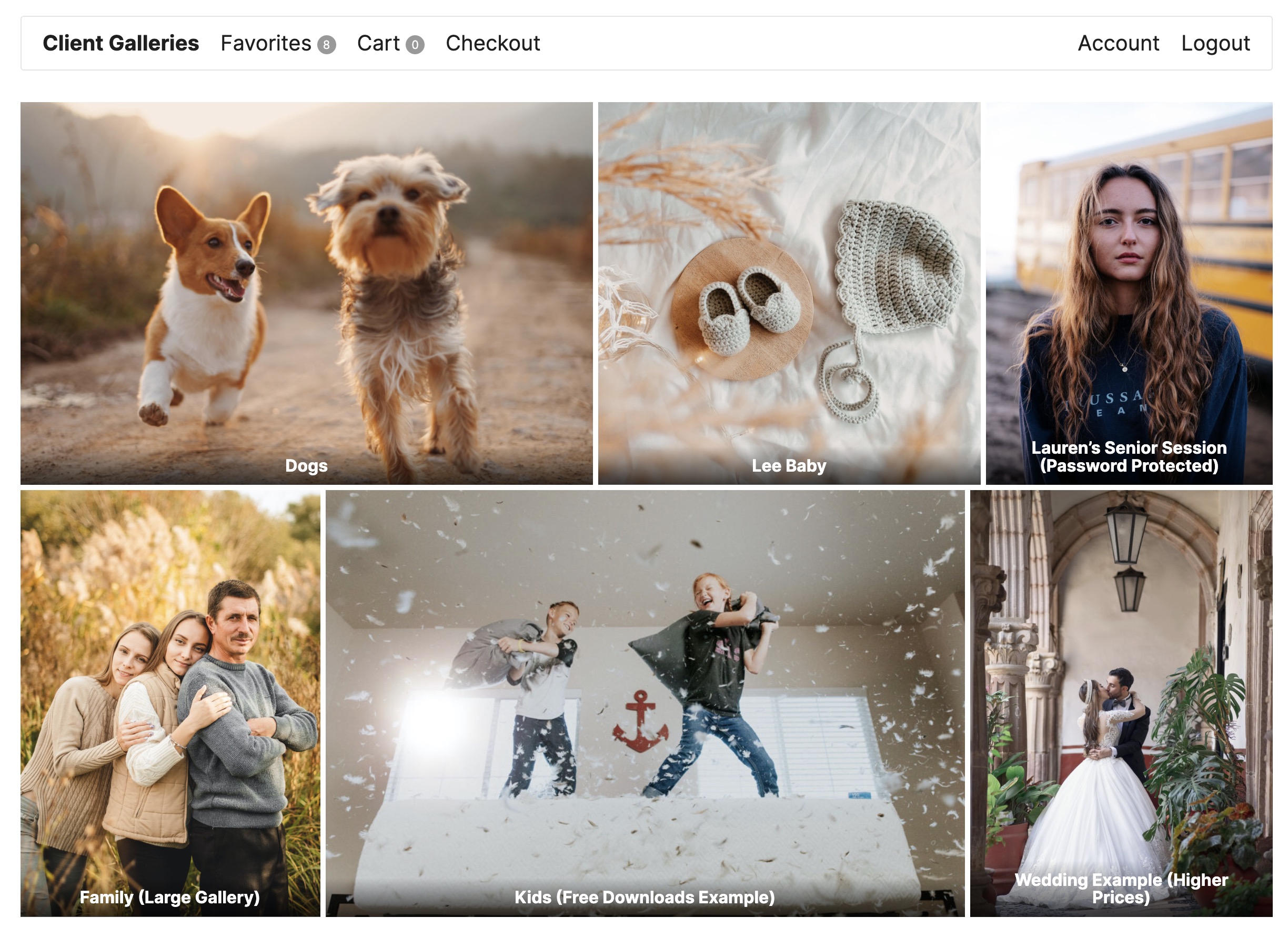
Client photo gallery main view – Browse all your client photo galleries in a beautiful, organized layout. Private galleries are only visible to assigned users or admins. 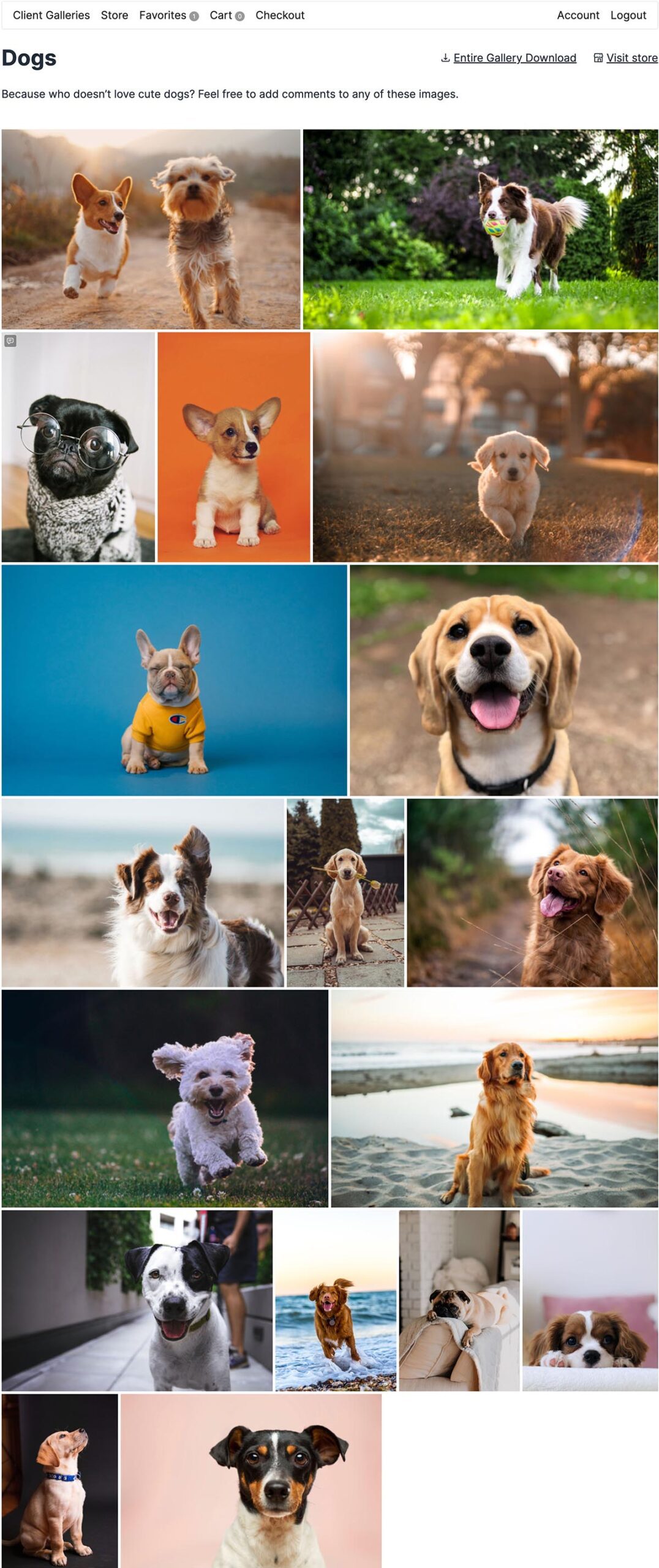
Photo proofing gallery view – Clients can browse proof galleries with expiration notices and watermarked images. Notice the favorites button and social sharing options! 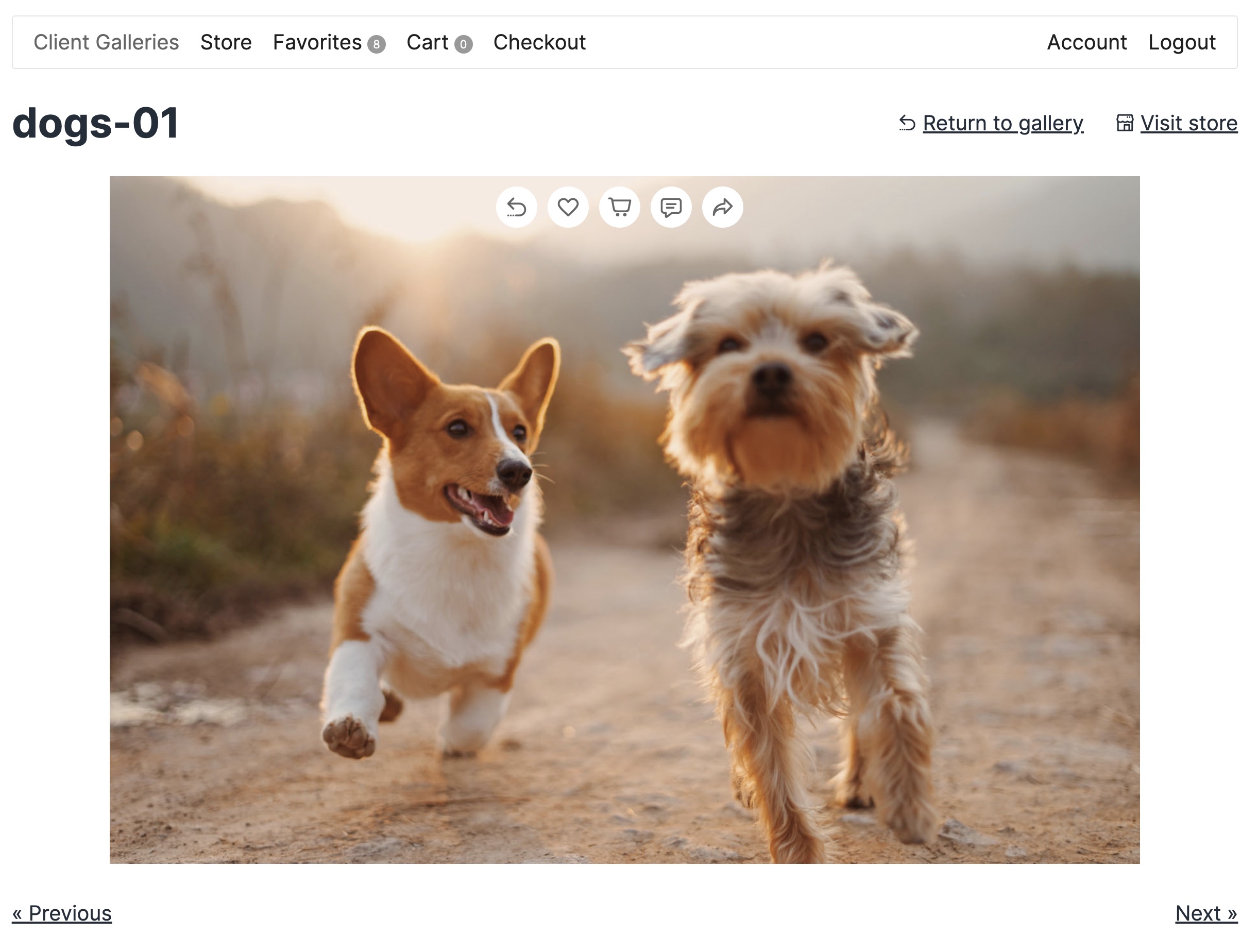
Single image view in client photo gallery – Clients can view full-size images, select products, and add photos to cart for purchase. 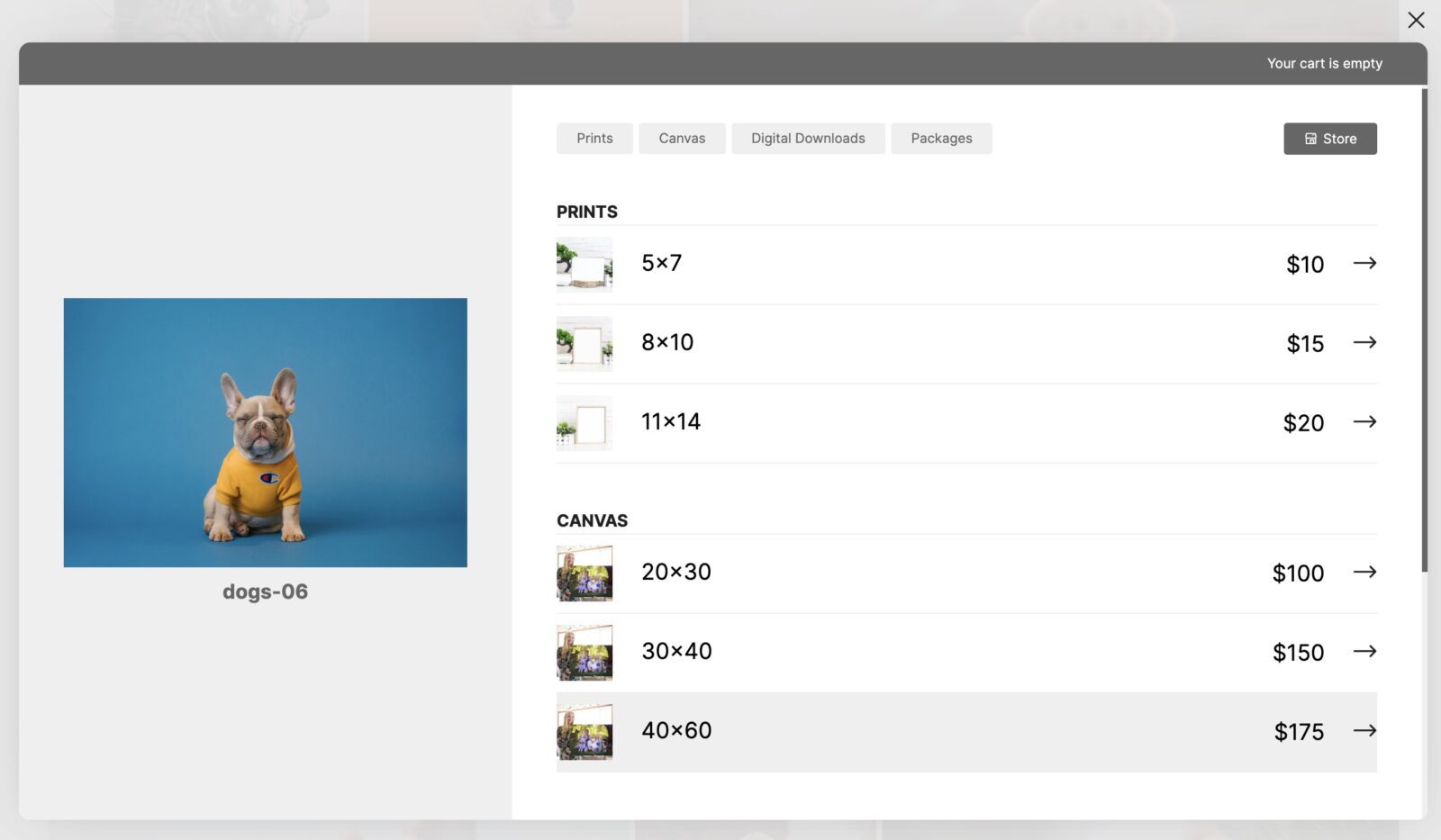
Shopping cart – Professional cart interface where clients manage selected photos and products before checkout. 
One-page checkout – Streamlined checkout process makes it easy for clients to complete their photo purchases quickly. 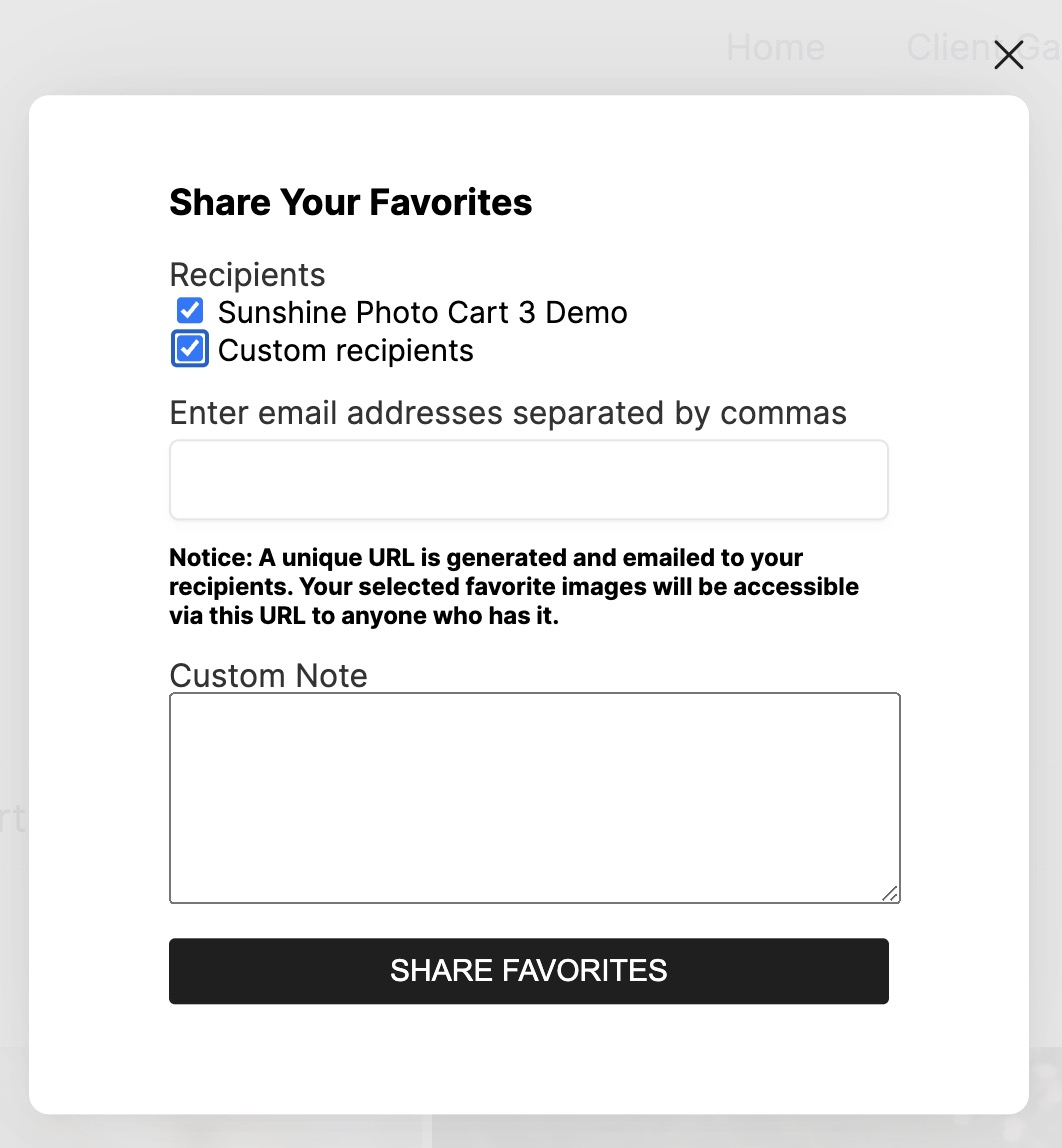
Add to cart screen – Clients select products (prints, digital downloads, etc.) and quantities for each photo they want to purchase. 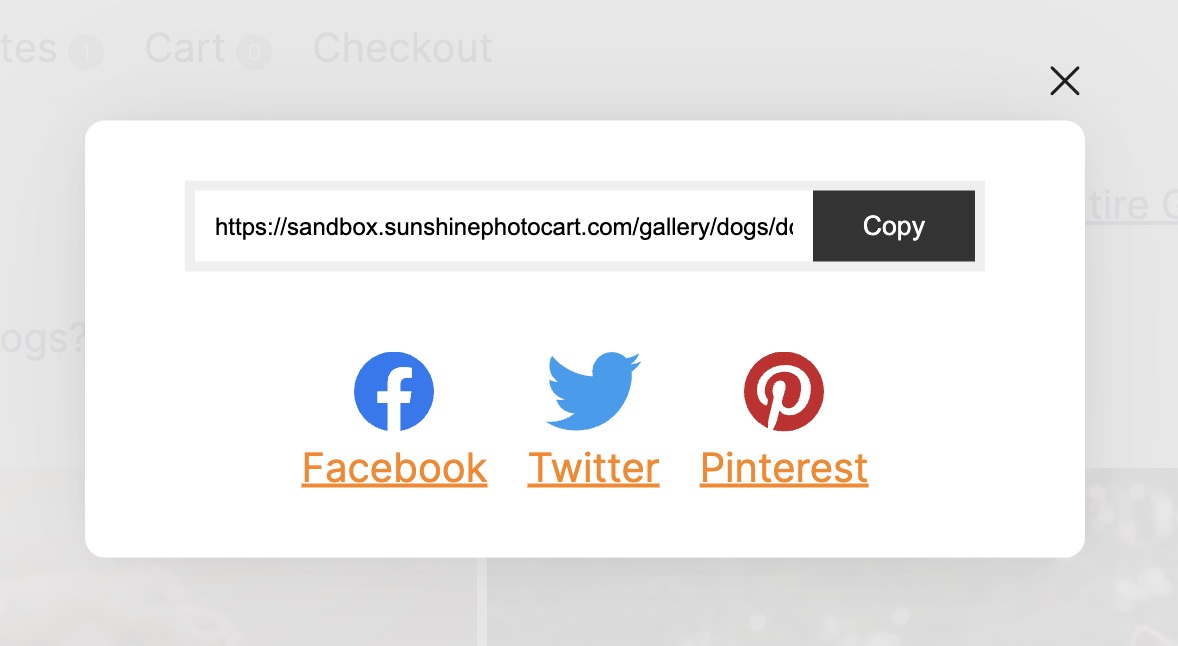
Store view – Alternative shopping experience showing products first, allowing clients to add multiple images to cart at once from your client photo galleries. 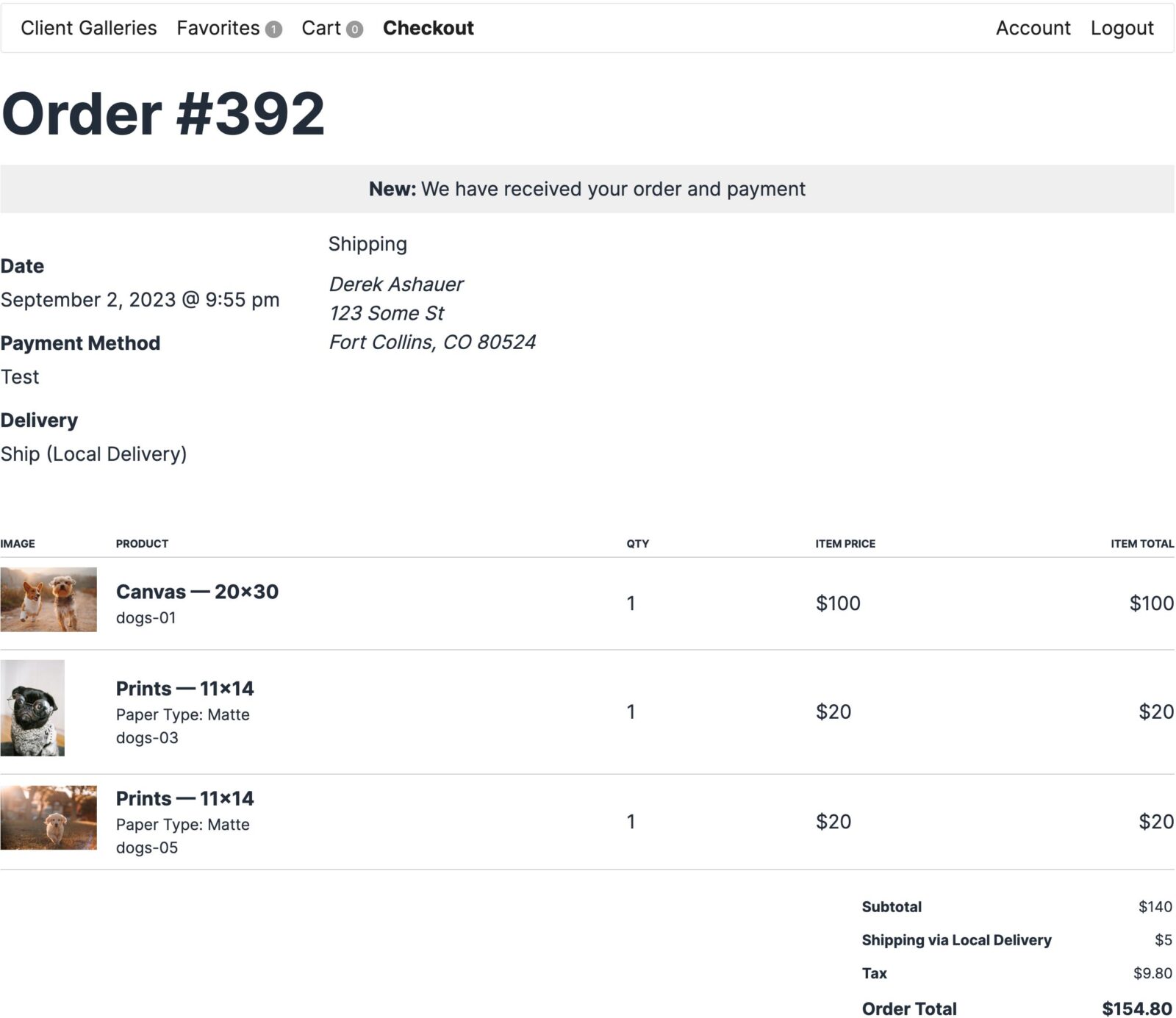
Favorites selection – Clients can mark favorite photos during photo proofing, making it easy to identify which images they want to purchase. 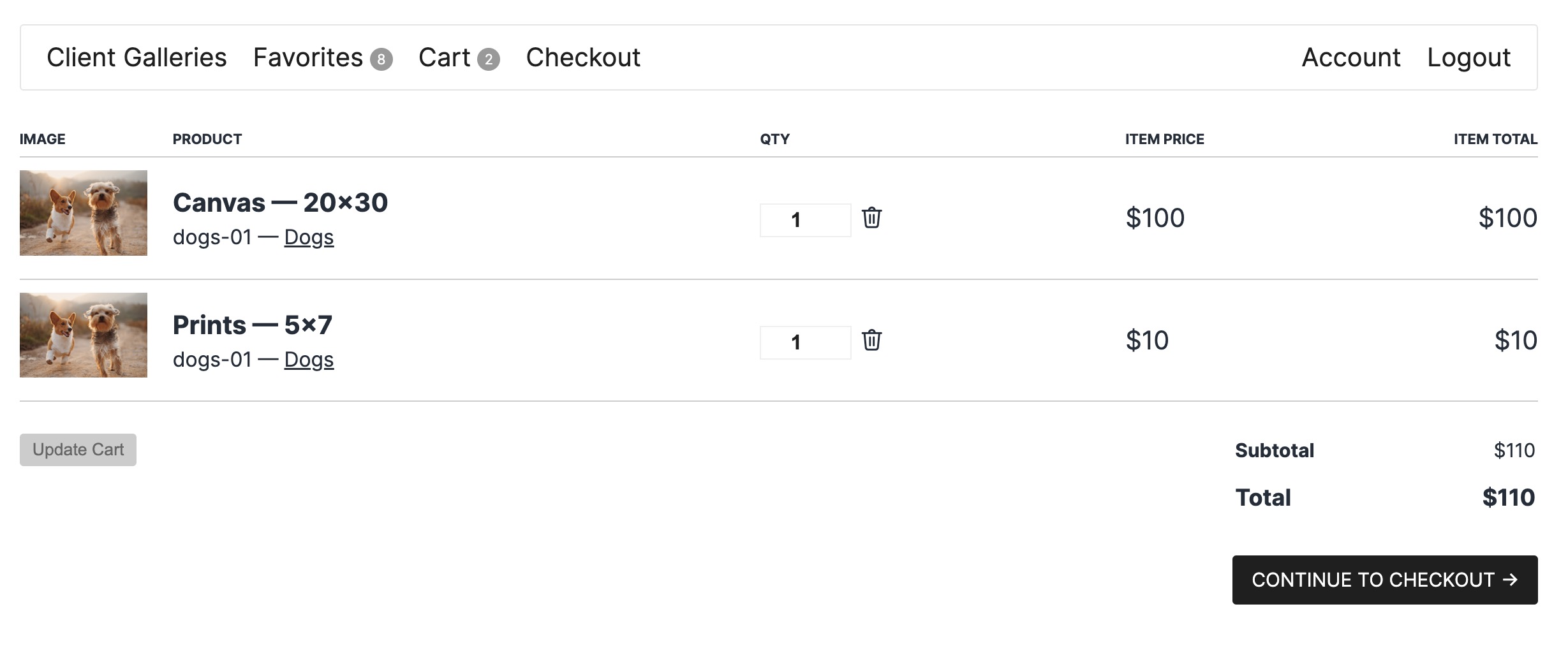
Social sharing – Enable clients to share galleries and images on social media to increase exposure and drive more sales from your client photo galleries. 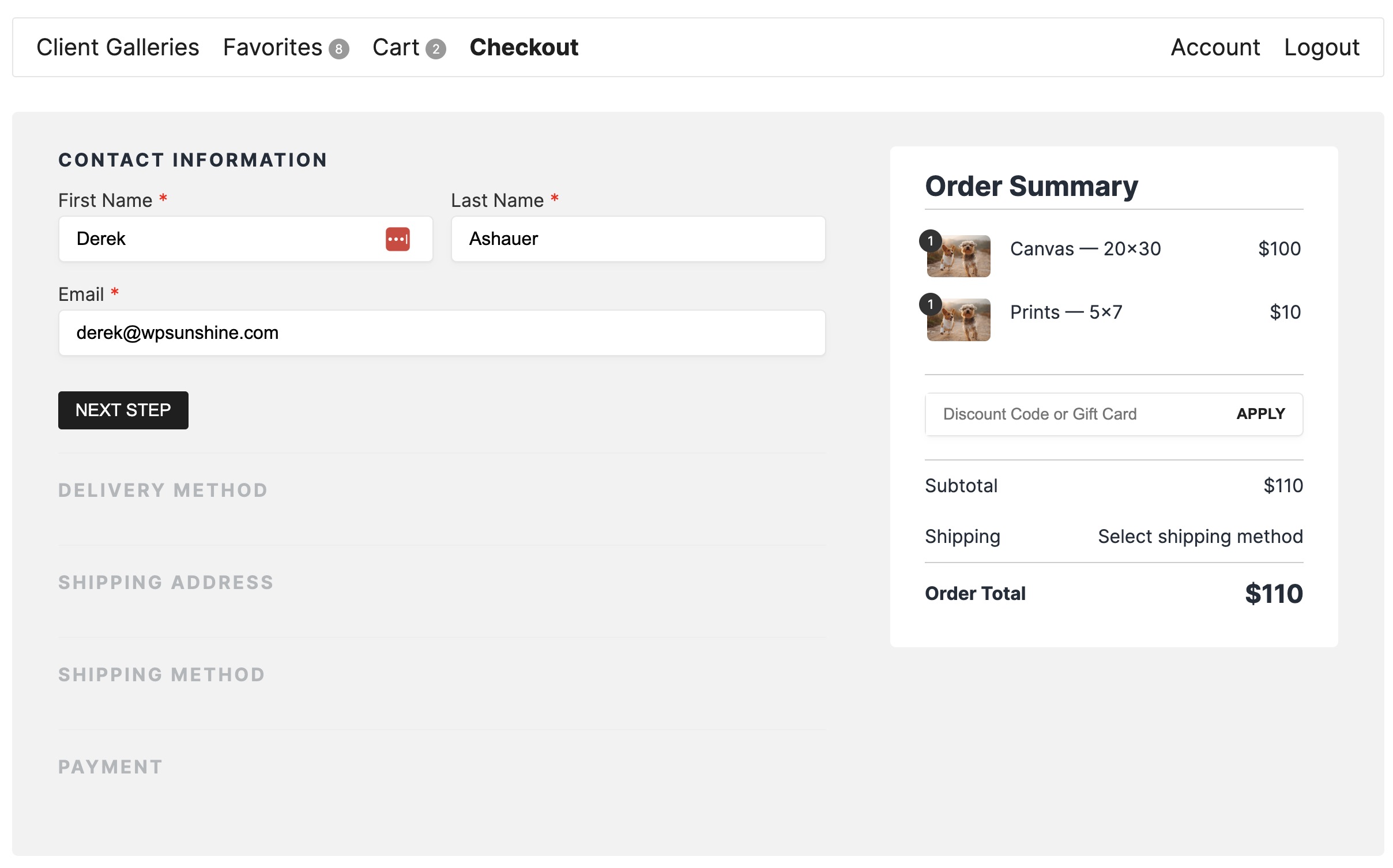
Order confirmation – Professional order confirmation page and email receipt for every purchase from your client photo galleries. 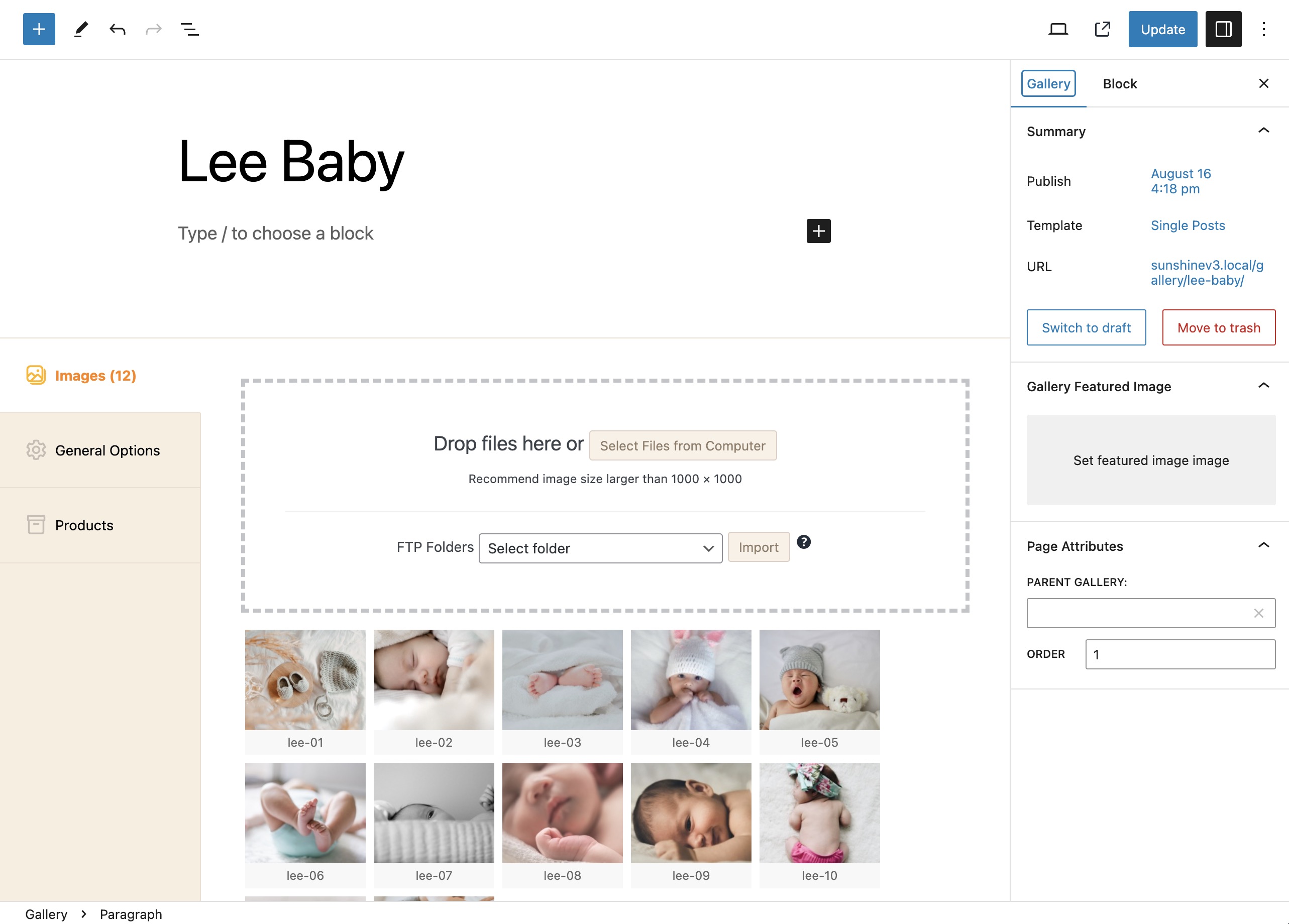
Admin gallery management – Easy-to-use admin interface to create galleries, upload images, and manage your client photo galleries and photo proofing workflow.
Εγκατάσταση
Get your client photo gallery up and running in 5 minutes:
- Activate the plugin – Install and activate Sunshine Photo Cart from your WordPress admin
- Configure settings – Go to Sunshine > Settings to set up your business information, payment methods, and shipping options
- Create products – Add your print products (e.g., 8×10, 11×14, 16×20) or digital download options
- Create your first gallery – Upload images and create your first client photo gallery
- Start selling – Share your gallery with clients and start accepting orders with zero commissions! 💰
Watch our video tutorial or try our live demo to see Sunshine Photo Cart in action.
Συχνές Ερωτήσεις
-
How do I create a client photo gallery for my photography business?
-
Sunshine Photo Cart makes it easy to create professional client photo galleries. After installing the plugin, go to Sunshine > Galleries and click “Add New Gallery.” Upload your images via drag-and-drop or FTP, set gallery access (password, email, or private), and share the gallery link with your clients. Your clients can browse photos, select favorites, and purchase prints or digital downloads directly from the gallery.
-
What is photo proofing and how does Sunshine Photo Cart help with photo proofing?
-
Photo proofing is the process of sharing photos with clients so they can review, select favorites, and approve images before final delivery or purchase. Sunshine Photo Cart streamlines photo proofing by letting you create password-protected proof galleries where clients can browse images, mark favorites, share with family, and purchase photos. Features like gallery expiration dates and favorites selection make the proofing process efficient and help convert more sales.
-
Can I sell photos to clients with this plugin?
-
Yes! Sunshine Photo Cart is built specifically for photographers who want to sell photos to clients. The plugin includes a full shopping cart system, multiple payment gateways (PayPal, Stripe, Square), product management, and order fulfillment tools. You can sell prints, digital downloads, and custom products with zero commissions or monthly fees.
-
How do I accept payments for photo sales?
-
Sunshine Photo Cart supports multiple payment methods. PayPal is included free with the core plugin—no fees, no add-on required! The free version also includes Stripe and Square, but these have a 5% platform fee (upgrade to remove fees). You can also accept offline payments like checks. Upgrade to unlock additional payment gateways including Authorize.net, Mollie, Mercado Pago, Payfast, Paystack, and Quickpay. See all payment gateways
-
Are there any limits on galleries, images, or products?
-
No! Sunshine Photo Cart has no limits on galleries, images, products, or orders. You can create unlimited client photo galleries, upload unlimited images, and sell unlimited products. The only limitation is your web hosting storage space. If you need more storage, Sunshine integrates with Amazon S3 via the WP Offload S3 plugin for unlimited cloud storage.
-
Can I password protect my client photo galleries?
-
Absolutely! Sunshine Photo Cart offers multiple ways to protect your client photo galleries. You can require a password, require an email address, require a user account, or make galleries completely private for specific users only. This ensures only your clients can access their photos.
-
Does this work for wedding photographers?
-
Yes! Sunshine Photo Cart is perfect for wedding photographers. Features like sub galleries let you organize large wedding shoots into categories (ceremony, reception, portraits, etc.), favorites help couples select their must-have photos, and social sharing lets them share galleries with family and friends. Many wedding photographers use Sunshine to deliver proof galleries and sell prints and albums to couples and their families.
-
Can clients download digital photos?
-
Yes, with the Digital Downloads add-on. This add-on lets you sell digital files at any size with instant, secure download access. Clients can purchase high-resolution digital files and download them immediately after payment.
-
Is there a demo I can try?
-
Yes! You can try our live demo to see how client photo galleries work, or create your own sandbox environment with full admin access to test all features.
-
What types of photographers use Sunshine Photo Cart?
-
Sunshine Photo Cart is used by wedding photographers, portrait photographers, school/sports photographers, event photographers, and fine art photographers. Any photographer who needs to share client photo galleries, deliver photo proofing galleries, or sell photos to clients can benefit from Sunshine.
-
Does Sunshine Photo Cart work with my WordPress theme?
-
Yes! Sunshine Photo Cart works with any WordPress theme and popular page builders. The plugin automatically integrates with your existing WordPress theme, using your theme’s styling and layout so your client photo galleries seamlessly match your website’s design. You can also choose from our custom design layouts if you prefer a dedicated gallery look. No technical expertise required—it just works!
-
Can I use this for client proofing without selling photos?
-
Yes! While Sunshine Photo Cart includes powerful e-commerce features, you can also use it purely for photo proofing. Create password-protected proofing-only galleries (with products disabled), let clients browse and select favorites, leave comments on images, and use the favorites system to understand which photos clients prefer—all without requiring purchases.
-
Where can I get help or support?
-
We offer comprehensive support through our support documentation and support forums. Our team is here to help you succeed with your client photo galleries.
-
Does this work with any currency?
-
Yes! Sunshine Photo Cart supports all currencies worldwide. Set your currency in Settings, and all prices, cart totals, and invoices will display in your chosen currency.
-
Can I help translate Sunshine Photo Cart?
-
Yes! We welcome translation contributions. Visit our translation site to see active translations, help refine existing translations, or start a new translation.
-
How do I report security vulnerabilities?
-
Security is important to us. Please report security bugs through the Patchstack Vulnerability Disclosure Program. The Patchstack team helps validate, triage, and handle security vulnerabilities responsibly.
Κριτικές


Συνεισφέροντες & Προγραμματιστές
“Sunshine Photo Cart – Client Photo Gallery & Photo Proofing for Photographers” είναι λογισμικό ανοιχτού κώδικα. Οι παρακάτω έχουν συνεισφέρει στη δημιουργία του.
Συντελεστές


Το “Sunshine Photo Cart – Client Photo Gallery & Photo Proofing for Photographers” έχει μεταφραστεί σε 9 γλώσσες. Ευχαριστούμε τους μεταφραστές για τις συνεισφορές τους.
Ενδιαφέρεστε για την ανάπτυξη;
Περιηγηθείτε στον κώδικα, ανατρέξτε στο αποθετήριο SVN ή εγγραφείτε στο αρχείο καταγραφής αλλαγών ανάπτυξης μέσω RSS .
Σύνοψη αλλαγών
3.6.5
- Fix: Regenerated images not re-uploaded to cloud storage after watermark changes
- Fix: Product categories created via the block editor not appearing on the taxonomy management screen
- Fix: Single product mode not triggering multi-image product image selection UI
- Fix: Redundant product database queries causing lock contention on high-traffic sites
3.6.4 – March 19, 2026
- New: Privacy setting to automatically delete galleries a specified number of days after they expire
- Fix: Google address autocomplete not working for address fields at checkout
- Fix: Tax calculated on pre-discount subtotal when discounts are applied before tax
- Fix: Package image selection showing blank when switching source dropdown on second or later items
3.6.3 – March 13, 2026
- Enhancement: Migrated image keywords to dedicated meta key for significantly faster search performance on large sites
- Fix: Image keyword search not returning results due to incorrect post status filter and metadata escaping
- Fix: How it checks for Imagick during watermarking process to really be sure it is available before trying to use it
- Fix: Optimized private gallery lookup query that could cause slowdowns on sites with many images
3.6.2 – March 6, 2026
- Security: Added nonce verification and access control checks to multi-image select AJAX handlers
- Fix: “Always collect an address” fields not reloading state/province options when country changes
- Fix: Tax rates not applied when using customer address fields instead of shipping address
- Fix: Automatically show address fields at checkout when tax rates require a specific location
- Fix: Stripe hosted checkout not including gateway fees in line items
- Fix: Stripe hosted checkout creating unnecessary duplicate payment intent
- Fix: Stripe hosted checkout compatibility with Accounts v2 (pass customer ID)
- Fix: Stripe hosted checkout overriding order status set by other plugins (e.g. digital downloads auto-ship)
- Fix: Stripe statement descriptor suffix failing when order number contains only digits
- Fix: Stripe payment failures for zero-decimal currencies (HUF, ISK, etc.) on accounts with older Stripe API versions
- Fix: Fatal error when guest adds or removes favorites with Analytics addon active
- Fix: Empty autocomplete attribute rendered on form fields when no value is set
- Fix: Share favorites not working for guests even when guest favorites are enabled
- Fix: Watermarked images now respect EXIF orientation data, preventing incorrectly rotated output
- Fix: Guest favorites not merging into account after logging in or registering
3.6.1 – March 3, 2026
- Add: Setting to enable or disable guest favorites
- Fix: Image search query causing database lockups on sites with large posts/postmeta tables due to unconstrained joins
- Fix: Stripe inline checkout orders not updating to paid status when using webhooks
3.6 – March 2, 2026
- Add: Caption option added to Thumbnail Content setting (from EXIF metadata)
- Add: Option to show image caption under single image view
- Add: Admin Gallery Navigator – Easier gallery management with lots of galleries and hierarchy
- Add: Guest Favorites – Users can add images to favorites for single session without account
- Add: Selection Tray – Show current favorites in a persisent floating section while viewing Sunshine galleries
- Add: Quickly add all favorites to cart
- Add: Delay gallery upload image processing so uploads can happen faster
- Add: Stripe – Hosted Checkout
- Add: Stripe – Additional customization options
- Add: Galleries pagination – paginate the main galleries list with numbered pages, load more button, or infinite scroll
- Add: Separate display settings for galleries list (columns, pagination style, per page) and images (columns, pagination style, per page)
- Add: Honeypot spam protection on login, signup, and password reset forms
- Add: Compatibility with Imagify, ShortPixel, and Image Optimizer (Elementor) plugins to prevent gallery image optimization
- Enhanced: Directly to single product details if only one product is available
- Enhanced: Settings now allow setup to set validation comparisons to other fields
- Change: Disable image sharing also disables sharing in Favorites
- Change: If a gallery has both sub-galleries and images, it will show sub gallery list first and then images below
- Fix: Do not rely on gallery/image, allow price level to be passed during add to cart from modal for General products
- Fix: Stripe properly handle zero-decimal currencies
- Fix: Fallback image dimensions for gallery images when they are not available as they should in rare situations
- Fix: Toggle email on/off and clicking save button reverted email status
- Fix: Order profit calculation was not taking into account line item discounts
- Fix: Infinite scroll pagination now properly waits for DOM to load
- Add: Privacy system – New Privacy settings tab with account erasure request handling, bulk personal data removal from orders, and configurable data retention periods for inactive accounts and orders
- Add: WordPress core “Erase Personal Data” and “Export Personal Data” integration for customer and order data
- Add: New “duration” settings field type (number + time unit)
- Fix: Search input fields being stripped out when included in a gallery description
- Add: Log files now use randomized filenames for improved security
- Add: New “Enable PHP error logging” option to capture PHP notices, warnings, and fatal errors to a separate log file
- Add: Log files are now downloaded through authenticated admin routes instead of direct file access
- Security: Block direct web access to log files via .htaccess
- Fix: Automatically prevent Yoast SEO and Rank Math from redirecting Sunshine gallery image pages when media pages are disabled
3.5.7.3
- Security: Add permission check on image data ajax request
3.5.7.2
- Security: Add capability check on upgrade functions
3.5.7.1
- Security: Add permission check/nonce on upgrade functions
3.5.7
- Add: Work with new text product option
- Add: New email template tag to show galleries in the purchase for admin orders
- Enhancement: FTP upload errors will show which image had an error while uploading
- Enhancement: Image assigned to gallery later in upload process to better ensure no processing errors happened first
- Enhancement: Regenerating images now prompts user on how to handle image watermarks before processing
- Fix: Dashboard stats calculations
- Fix: Option pricing added twice when showing order line items
- Fix: PayPal Legacy not properly including line item discounts
- Fix: PayPal Legacy not setting order status to new in webhook
3.5.6.2
- Fix: Overzealous escaping caused issues in various places, take 2
3.5.6.1
- Fix: Overzealous escaping caused issues in various places
3.5.6
- Fix: Address Autocomplete at checkout
- Fix: Not saving line item discount amount to database, so not showing in receipts/admin
- Fix: Tons of escaping functions and other changes to meet Plugin Check guidelines
- Fix: Fix saving customer notes during checkout to customer meta and clearing out customer notes from usermeta as it is unnecessary data
- Fix: Only run the update processes for the versions that are needed, also run if versions may have been skipped
- Update: Translations
3.5.5
- Fix: Further refinements to line item subtotal calculations
- Fix: FTP import existing image check to be case insensitive
- Enhancement: Stripe – Improved order recovery for users who refresh or do weird things while payment is processing that interrupts the normal flow
- Enhancement: Stripe – Improved indicator that payment fields are still loading to help with slow connections
- Add: Allow 3 character currency code to be displayed along with all prices
3.5.4.2
- Fix: Further refinements to line item subtotal calculations
- Fix: Square charge wrong total that go directly to payment section on Checkout
3.5.4.1
- Fix: Subtotal display not giving proper total when line item has discounts and no tax is set for current cart
3.5.4
- Enhancement: CSS updates in add to cart to improve buttons and mini cart
- Enhancement: CSS updates for general store product list items, entire product line clickable
- Enhancement: Show discounts in all cart/checkout/emails before/after tax based on settings
- Change: PayPal – disable inline card form, users can still pay with card within PayPal popup
- Fix: [sunshine_galleries] shortcode in page content returns true for is_sunshine()
- Fix: Require a valid order ID on init order to continue to payment processing
- Fix: Cart line item sub total display when discounts are applied
- Fix: Better organize prices internally when prices are entered with tax
- Security: Add nonce to Stripe disconnect process
3.5.3
- Add: Custom label/description for Pickup delivery method
- Fix: Stripe reusing customer ID during guest checkout
- Change: Stripe – set custom payment description
- Change: Adjust gallery search to also consider Access Type for parent galleries
- Enhancement: Justified gallery/image layout CSS
3.5.2
- Add: sunshine_favorites_file_names_separator to better customize how file names for favorites are displayed
- Change: Help ensure session garbage cleanup is run regularly
- Fix: Rounding errors when tax is included in price
- Fix: Showing proper subtotal when tax is included in price
- Fix: Tax + Discount calculations in set_tax for cart
- Fix: Conflict with Elementor for order filter by gallery
- Fix: Clean up translations
3.5.1
- Change: Minor tweak to checkout submit element to better work with add-on gateways
- Change: PayPal Legacy always clear cart on return
- Change: Remove logging of metadata during checkout flow
- Fix: Stripe – Don’t run on init_order when Stripe not selected
- Fix: private get_mode() for payment methods causing errors with outdated gateway add-ons
3.5
- Enhancement: Under the hood checkout flow process
- Enhancement: Improved search results to handle multiple keyword searches
- Enhancement: Translations updated
- Add: Orders can be filtered by gallery
- Add: Help link to Sunshine admin menu
- Add: Link to view all comments from a customer
- Add: Option to disable invoices with orders (Settings > Checkout > Orders)
- Add: Conditional needs_delivery() for all products so this section can be disabled at checkout if allowed based on cart items
- Add: Email receipt template tags for receipt/invoice link/url
- Add: Custom CSS for emails in Settings > Design > Customizations
- Add: More currencies
- Add: Check during gallery image upload that images meet the size requirements, shwo error if they do not
- Add: Gallery option to enable Open Graph data to be used for gallery/image pages (your SEO plugin may already be doing this though)
- Add: WhatsApp to gallery/image sharing options
- Change: In multi-image selector sources, only show galleries with images
- Change: Cover theme hides cover photo when in store view
- Change: Hide main galleries link also hides the return to parent gallery link
- Enhancement: JS passing more data for product show details event for add-ons to hook into
- Enhancement: Filters on discount data
- Enhancement: Admin order details page, add link from line item thumbnail to image details screen
- Enhancement: sunshine_get_gallery_descendant_ids optimized for query speed
- Enhancement: Improved Order Summary on checkout page for mobile
- Fix: Square gateway works with cards requiring SCA
- Fix: During image upload, do our own EXIF exploration to get the true created_timestamp and not rely entirely on WP
- Fix: Confirm data format for gallery emails before adding new one to prevent fatal error
- Fix: Discount calculation use subtotal when checking for minimum order amount
- Fix: Assigning/unassigning favorites and adjusting quantities in multi-image select view
- Fix: Custom email template check
- Fix: Show payment method fees on order details page
- Fix: Do not remove favorites when local image URL not found as they could be hosted at S3
- Fix: Shipping as Billing feature in checkout (currently only used with Square)
- Fix: Calculate tax on discounted amount for items
- Fix: PayPal refund in admin handle “pending” status when showing result message
- Fix: Include fees on order invoice template
- Fix: Tracking latest login time
- Fix: Restore order count to main admin menu
- Fix: Selecting images from other source galleries beyond original during store add to cart flow
- Fix: Mobile styling in store add to cart modal
3.4.12
- Fix: Security Fix: admin password could be reset via customer account password reset if admin user_login is known
3.4.11
- Add: Product minimum quantity (per cart line item)
- Fix: Discount variable typing for allowed galleries removed as caused slowness in rare instances
- Fix: Add error checking during watermark process to prevent fatal error when watermark PNG file is not valid
- Fix: Watermarking work with more file formats: jpg, gif, webp
- Fix: Security vulnerability around unused Stripe webhooks
3.4.10
- New shortcode: sunshine_cart_quantity
- New shortcode: sunshine_mini_cart
- Fix: Line item subtotal function in receipt emails
- Fix: Cart line item to properly show image file name when using “filename” image name setting
- Fix: Show all discount names in receipt emails when multiple discounts are applied
- Fix: Process price_level in add to cart via URL
- Fix: Remove existing items from cart if the product pricing has since been removed
- Fix: is_sunshine_page() special condition check for checkout to see if we are actually on receipt page
- Update: Add additional code for EWWWW compatibility so it does not affect watermarks from their recent updates
3.4.9.1
- Fix: Left debug line showing file shoot time instead of file name in gallery admin
- Fix: Discount allowed galleries force check for array value
3.4.9
- Add: New filter – sunshine_product_max_qty
- Add: New setting – disable random strings in image file names for security
- Fix: Improved check for when to increase qty vs add new line item
- Fix: Order log use selected timezone time
- Fix: Line item subtotals when prices enter with tax and shown with tax
3.4.8.1
- Fix: Rename hook back to “sunshine_checkout_create_order” to fix compatibility with various add-ons
3.4.8
- Add: Product category descriptions shown in image add to cart modal
- Add: Filter ‘sunshine_order_email_search_replace’ to allow custom checkout fields to order emails
- Add: Automatically ignore optimization in EWWW Image Optimizer plugin for all Sunshine gallery images to prevent issues
- Update: Prices in cart always use most recent product pricing instead of when added to cart
- Update: Include product photo in Store if exists
- Fix: Button styling dark on dark in packages modal
- Fix: Default watermark state to true so it applies in other add-ons/areas as expected after adding new optional watermark setting
- Fix: Image/folder deletion on FTP import when successful if option is set
- Fix: Don’t redefine DONOTCACHEPAGE if already set
- Fix: Apply masonry properly to all instances of a gallery list on a single page
3.4.7.1
- Fix: User search bugs introduced in last update
- Fix: Watermark toggle at gallery upload now works with FTP import
3.4.7
- Fix: Prevent duplicates in customer/user search in meta user fields
- Fix: Regenerate images follows watermark setting for individual image at upload, fallback to default if not set
3.4.6
- Add: Ability to disable watermarks during drag/drop image upload process
- Update: Delete custom Sunshine gallery image folders after all it’s images have been deleted
- Fix: Not showing password reset screen when disable signup is enabled
3.4.5
- Fix: 100% discounts not applying to tax due to recent change that has been reverted
- Updated: translations
- Fix: Obey “Disable Signup” at checkout by not showing/requiring a password and effectively allow guest checkout
- Add: More granular capabilities for access to various areas such as reports, tools, customers, add-ons
- Fix: Classic theme CSS styles on mobile for search/password forms in header
3.4.4
- Fix: Double Before Content with Classic theme
- Fix: Classic CSS menu/header styling for mobile devices
- Fix: Sunshine Manager capabilities to edit gallery images
- Fix: Issues with watermarks not being applied after recent new enhanced image security features
3.4.3
- Fix: Orders paid with credits not moved to “new” status
- Fix: Bug hiding password field at checkout
3.4.2
- Update: New user sign up without password, new account email includes link to set password
- Fix: Stripe creating many pending payments
- Fix: Stripe not charging proper amount when credit is applied
- Fix: Change “sunshine_set_discounts” timing so rule application can happen after any are auto added
3.4.1
- Fix: htaccess rules to allow loading thumbnail in emails
- Fix: Order status setting fixed for all gateways during checkout flow
- Fix: Offline payment instructions included in email
3.4
- Add: Enhanced image protection via htaccess rules + file naming conventions
- Fix: Square order email sent before order status updated to “new” status
- Add: “notify” notice type styling
3.3
- New! Ability to set pricing on a per-image basis
- Fix: Wrong price level for imageless products when adding to cart from store
- Adjusted mobile modal styles
- Fix: Ajax powered galleries field to also include Direct URL access galleries
- Fix: Multi-image select only allows max qty 1 on digital products in store (and for packages)
- Fix: Handling async payment methods in Stripe
- Fix: Issues with action triggered emails sending to same person multiple times
- Fix: Do not send new account registration emails when admin is the one triggering it
- Fix: Add “products” as available settings field
- Fix: Classic theme CSS styles
- Enhancement: Better support for Yoast Open Graph images to use the sunshine-large size
3.2.11
- Fix issue with conflicting settings: disable account vs no guest checkout. No guest checkout takes precedence.
- Fix issues showing main galleries page content in Classic/Cover themes
- Slight CSS style adjustments to action menu
- Add customer notes to order invoice
- Use wp_safe_redirect to ensure no malicious redirects to external sites happen
- Do not set first shipping method to default for cart unless there is only 1
3.2.10
- New ajax powered Products meta field
- Secure ajax powered meta fields with nonces
- New gallery image sort new to old for image shoot time
- Include gallery hierarchy in admin order email for each line item
- Revert max quantity for a product to be per line item, not entire cart
- Fixed security around tools
- Fixed security around connecting to Square/Stripe
3.2.9
- Fix tracking count query which used hardcoded database table prefix
- Fix child gallery password form when parent gallery requires password
- Fix mobile styling for Account > Orders
- Add URL query arg after entering gallery password or access code to help bust cache
- Fix issues around available delivery methods during checkout based on items in cart
- Fix security issue found by Patchstack allowing access to add-on toggling by customers
- Updated translations
3.2.8
- Better display on product details when product has a max quantity
- Properly limit cart line item quantity based on product max quantity
- Sunshine Manager role can update Sunshine settings again
- Sunshine Manager role can access Discounts
- Cart items can now have metadata when adding to cart
- Fix showing shipping on all order total screens when it is free
- Fix admin Emails table styling
- Properly send order receipt when doing refund and option checked for Stripe/Square
- Include refunds on all order total screens
- Invoice show gallery hierarchy
3.2.7
- Remove tax basis setting, not used
- Install/update process adds permissions to access order statuses for Sunshine Manager
- Above miraculously fixes issue with Sunshine Manager not being able to access Orders :shrug:
- Sunshine 3 upgrade process deletes all user carts to ensure we do not have old Sunshine 2 cart data
- Fix Square API calls to get locations
- Fix Square order total so it never has decimals
- Fix call to function to make cover image when cover theme is active
3.2.6
- Sanitize session data differently to allow special characters
- Fix admin meta conditional javascript function name to allow multiple conditions
- Notes field moved above payment field at checkout
- Filter for default category when saving product in admin
- Prevent duplicate image IDs in galleries
- Products in cart can require a customer create an account at checkout
- Fix XSS vulnerability found by Le Ngoc Anh/Patchstack
3.2.5
- Add new Product Type filter in products admin table
- Hotfix – Not logged in multi-image selection fix
3.2.4
- Remove Stripe/Square SDKs, use native functions to massively reduce overall file size of plugin
- Fix mobile image select for gallery image upload in admin
- Filter sunshine gallery images to not use Jetpack/WordPress.com Image CDN to prevent watermark issues
- Fixed and improved discount validation check rules and applying discount per line item
- Fix get product max quantity check function (remove version without filter)
- Update icons used for better UI consistency
- Fix and improve the multi image selection JavaScript
- Set lang strings to be passed to sunshine.js so they can be translated
- Translations updated
3.2.3
- Show ID in admin table list for galleries and products
- Update add to cart to allow empty gallery ID for general products
3.2.2
- Prevent ability to favorite images from private galleries current user does not have access to
- Translations updated
3.2.1
- Fix allowing free shipping with discount code + restrictions
- Fix add to cart permission checks to allow Sell Anything products with no image
- Updated order access check function
- Fix getting cart total as proper float value
3.2
- New! Drag and drop to set the order of payment methods
- New! Add new Stripe option to configure layout: tabs vs accordion
- New! Add-on category filters to make finding add-ons easier
- Adjust the Checkout payment options so the payment fields are closer to the selected payment option
- Checkout will auto select the first payment option even if multiple are available
- Fix [sunshine_gallery show_main_menu=”false”] does not show main menu
- Adjustment to cart_total_formatted()
- Add filter to customer gallery query args
- Style adjustments to mobile checkout
- Adjust checkout shipping/payment selection to make it more clear they are selectable options, default to first if none yet selected
- Fix resending order receipt email so it does not send to the admin